


Camera care keeps your gear sharp, reliable, and ready for every shoot. A simple routine helps prevent dust spots, blur, battery trouble, and expensive repairs. Safe lens cleaning, quick sensor protection, smart storage, and regular updates all make a real difference. A few easy habits can help your camera and favorite lens last much longer.
A camera works best with steady care that fits real use. This guide covers safe cleaning, cleaner lens swaps, dry storage, and better battery and card habits. Each tip is practical, easy to follow, and made for everyday shooting. One small change today could save a lens tomorrow.
Clean the Camera Body Safely
Before you start wiping anything down, turn the camera off and remove the battery so you don’t trigger buttons, stress moving parts, or risk electrical damage while cleaning. That simple power off step helps you care for your gear like someone who knows the routine.
Next, put on anti static straps to protect sensitive electronics. Use a soft microfiber cloth to lift dust, skin oils, and grime from the body, grip, screen edges, and buttons. In case dirt sticks, lightly dampen the cloth with cleaner made for camera surfaces, never spray the body directly.
Then work around dials, seams, ports, and the hot shoe with gentle pressure. A small blower helps clear crumbs from tight spots. As you clean, you’ll feel more confident, and your camera stays ready for every shoot with your crew.
Keep Your Camera Lens Dust-Free
To keep your lens clear, start with a soft lens brush to lift away loose dust without scratching the glass.
Then use a blower to push off stubborn particles, since your breath can leave behind moisture and marks.
After you’re done, store your camera with the front and rear lens caps on, so dust stays out and your gear stays ready.
Use A Lens Brush
Start with a lens brush anytime you spot dust on your camera lens, because those tiny particles can dull your photos and leave you curious why your shots don’t look as crisp as they should. Choose a brush made for lenses, with soft bristles that lift grit without dragging it across the glass.
Then hold your camera steady and use a delicate sweep from the center outward. That motion helps move dust away instead of pushing it around. Work slowly, and don’t press hard. Your lens coating is tough, but it still deserves care.
This small habit helps you protect image quality and feel more confident each time you shoot. Whenever your gear looks cared for, you feel ready to create, share, and stay connected with fellow photographers everywhere.
Apply Air Blower
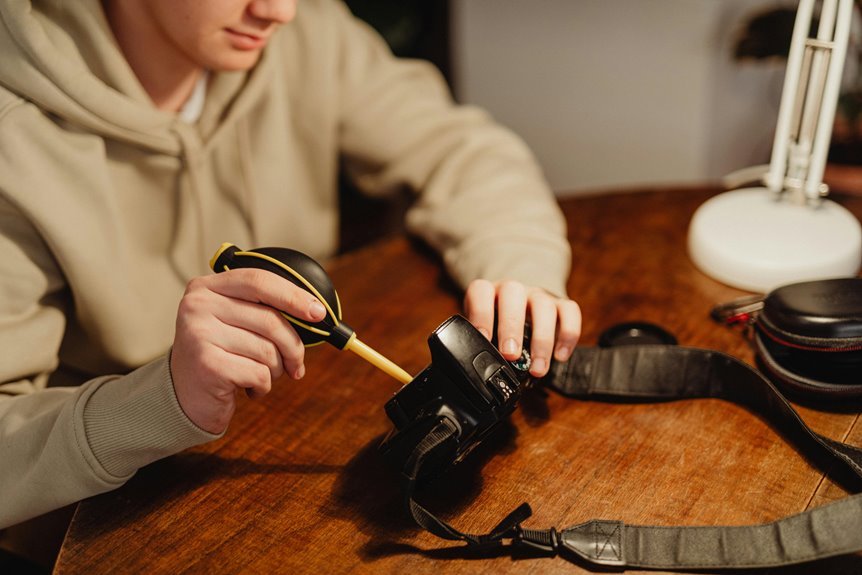
Sometimes, a quick burst from a rocket blower is the safest way to lift loose dust off your lens without rubbing that grit into the glass. You protect image quality, and you stay part of the careful habits every camera owner learns with time.
Hold the camera so dust can fall away, then aim the blower at the lens surface from a short distance. Use steady squeezes instead of sharp blasts. That gives you control and lowers the chance of blower moisture reaching the glass. Never use your breath, because it leaves residue behind.
In case you’re cleaning near the sensor area, stay cautious and avoid sensor contact unless you’re using proper tools. Once you make this small step part of your routine, your gear stays cleaner, your photos stay crisp, and you feel ready.
Store With Lens Caps
Even after you’ve blown away loose dust, your job isn’t quite done, because storing your camera with both front and rear lens caps in place helps keep that clean glass from picking up new debris right away. This simple habit helps your gear stay ready, and it makes you feel like part of the group that truly cares for every shot.
Just as crucial, check caps before you attach them. Dirty caps can transfer grit, so cap contamination prevention matters as much as cleaning the lens itself.
Wipe caps with a microfiber cloth, store them in a clean pocket, and replace loose or cracked ones quickly. Smart lens cap replacement protects coatings, blocks moisture, and keeps dust from sneaking in while your camera rests in your bag, on a shelf, or between photo walks with friends.
Protect the Sensor During Lens Changes
As you change lenses, you expose your camera’s sensor to dust, moisture, and tiny grit, so a careful routine matters more than most people realize. Before you swap, power the camera off and get the next lens ready with its rear cap removed.
Then use downward positioning so loose particles fall away instead of drifting inside.
Just as crucial, practice environmental avoidance. Step away from wind, rain, surf, and sandy ground before opening the mount. Keep the change quick but calm, and never blow with your breath because moisture can cling to the sensor area.
In case you spot dust later, use a blower tool made for cameras, not your shirt sleeve or a tissue. These habits help you protect image quality and feel confident shooting with the same care trusted photographers use daily.
Use Straps and Padded Cases
You protect your camera every time you use a sturdy strap and carry it with care. A padded case also cushions your gear from bumps, scrapes, and the small accidents you can’t always prevent.
Together, these simple habits make daily handling safer and storage much smarter.
Secure Carry Habits
Because cameras face the most risk while they’re in your hands or moving from place to place, secure carry habits matter just as much as cleaning and storage. You protect your gear best whenever you make safe handling feel natural, not fussy or awkward.
Start with a strap you’ll actually wear, then keep it adjusted so your camera stays close to your body. Use a firm hand grip whenever you lift or shoot, especially in crowds, on stairs, or near hard surfaces.
In case you prefer quick access, choose secure holsters that hold the camera snugly without letting it swing. Padded cases help during travel, daily commutes, and busy group outings where bumps happen fast.
As you carry your camera with care, you’re part of a thoughtful community that values every shot and every tool.
Protective Storage Choices
While daily handling protects your camera in the moment, smart storage choices protect it the rest of the time. Whenever you put your gear away, choose a padded case that hugs the body and lens, so bumps don’t turn into repair bills. Keep the strap attached too, because it adds one more layer of security whenever you’re packing, lifting, or unpacking with friends on a shoot.
Just as carry habits reduce drops, storage habits fight moisture and dust. Slip silica gel packs into your bag to absorb damp air, and store your camera in a cool, dry place.
Check weather seals often, especially should you shoot outdoors, because worn seals let moisture creep in. Use lens caps, close every zipper, and give each item its own safe spot. Your gear will stay ready.
Store Camera Gear Away From Moisture
Even though your camera looks dry on the outside, moisture can still slip into the body, lens, and small internal parts, where it could lead to mold, corrosion, and costly damage. To keep your gear safe, store it in a dry place with steady temperature control, not in damp basements, hot cars, or steamy bathrooms. Add silica gel packs to your camera bag or storage case so they can pull extra moisture from the air.
That simple habit works even better whenever you let your camera rest before packing it away after cold or rainy shoots. Wipe the exterior gently, then leave the bag slightly open until any trapped dampness fades.
In case you travel often, use a sealed case in humid weather. These small steps help you protect the gear you count on and keep it ready.
Check Batteries, Contacts, and Memory Cards
Keeping moisture away protects the outside of your camera, and checking the power and storage parts helps protect what happens next as you press the shutter. Start with your battery. Remove it, look for swelling, and make sure it still holds a steady charge. Then inspect the battery terminals and contacts for dust, fingerprints, or corrosion. A clean, dry microfiber cloth works well here.
Next, give your memory cards the same attention. Check for cracks, bent edges, or dirt on the metal contacts. Format memory cards in the camera after backing up files, so they stay reliable for your next shoot. Also, store spare cards in a protective case, not loose in your bag.
These quick checks help you feel ready, connected, and confident every time you head out together.
Update Camera Firmware Regularly
Because your camera is really a small computer, firmware updates matter more than many people realize. Whenever you install the latest version from the manufacturer, you often fix bugs, improve stability, and release useful features that make shooting feel smoother and more reliable for your whole creative routine.
Just as you check power and storage, you should also check for updates on a regular schedule. This helps with firmware compatibility between your camera, lenses, cards, and connected apps. It can also deliver a real performance improvement, including faster autofocus, better battery use, and stronger system response.
Before you update, charge the battery fully, back up your settings, and follow the maker’s steps carefully. Staying current helps you feel confident, capable, and ready each time you pick up your camera.
Check Photos for Dust Spots and Blur
While your camera might look clean on the outside, your photos often reveal problems that your eyes miss. Review a few test shots on a bright screen, especially against clear skies or plain walls. Dust spots, soft edges, and other image artifacts usually show up there initially, and catching them promptly helps you stay confident with the group.
| What you notice | What it could mean |
|---|---|
| Dark spots in same place | Sensor dust needs attention |
| Overall softness | Lens smudge or camera shake |
| Missed sharp focus | Check focus calibration |
Next, zoom in and inspect corners, not just the center. Should blur repeat across several frames, your lens or autofocus could need care. When you check images this way, you protect quality and keep your gear ready for every shared shoot together.
Build a Camera Maintenance Schedule
After you spot dust, blur, or focus issues in test shots, the smart next step is to put your care routine on a simple schedule you’ll actually follow. A calendar keeps your camera reliable and helps you feel like part of the group that’s always ready to shoot.
Start with weekly wipe-downs, then add monthly inspection schedules for seals, cables, and mounts. From there, plan quarterly sensor checks, lens filter cleaning, and firmware diagnostics so small problems don’t grow.
- Set phone alerts for cleaning, storage checks, and battery removal
- Log autofocus tests, playback quality, and weather seal condition
- Book seasonal deep cleans or professional service before busy shoots
This rhythm makes maintenance feel doable, not overwhelming. You’ll protect image quality, catch wear promptly, and build habits that support every session with confidence.
Frequently Asked Questions
When Should I Seek Professional Camera Cleaning Instead of Cleaning It Myself?
Seek professional camera cleaning if you suspect sensor damage, spot lens fungus, or do not feel confident cleaning the sensor safely yourself. Expert service helps protect your equipment and reduces the risk of expensive repair mistakes.
How Often Should Outdoor Camera Weather Seals and Gaskets Be Inspected?
Inspect outdoor camera weather seals once a month because sun, rain, dust, and temperature changes can wear them down faster than many people expect. Check them again after major storms or sharp seasonal shifts to keep the housing sealed and the camera protected.
Do Anti-Static Wrist Straps Matter When Cleaning Camera Electronics?
Yes, they matter because they lower the chance of electrostatic discharge that can harm delicate camera circuits. Wearing a wrist strap adds a practical layer of protection while you clean, especially around sensors, boards, and ribbon connections.
How Can I Tell if Autofocus Calibration Is Causing Soft Images?
If your photos look soft even when the camera is steady, the light is good, and the shutter speed is fast enough, autofocus calibration may be the cause. Take several shots of the same subject and check where focus lands each time. If focus keeps falling in front of or behind the intended point, your lens may need calibration.
What Maintenance Checks Should I Perform on Camera Cables and Connectors?
Inspect camera cables once a month for frayed insulation, cracked outer jackets, loose shielding, and stress near bend points. Check connectors for corrosion or bent pins, clean contacts with appropriate tools, verify that each connection seats firmly, and confirm stable signal transmission during use.
