

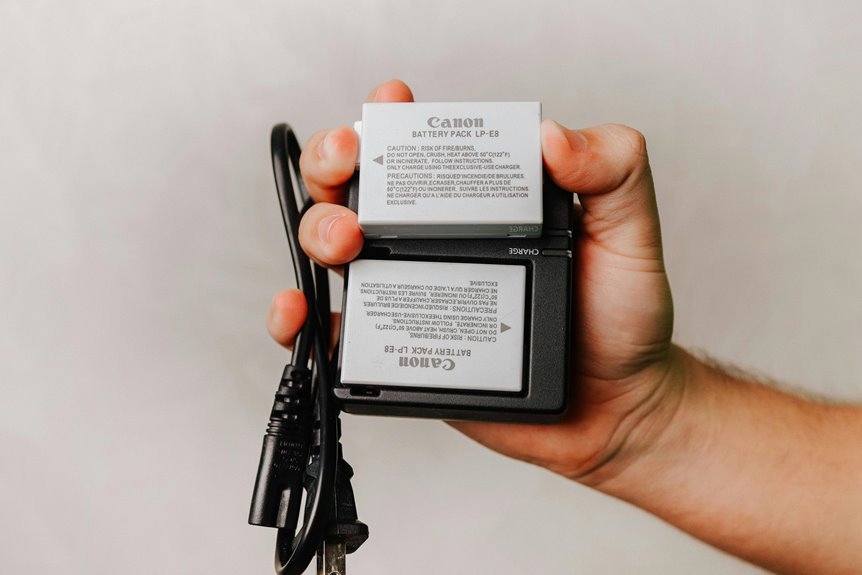

A dead camera battery can end a great shoot in no time. The best way to make it last longer is to cut power drain from the screen, wireless features, autofocus, and video settings. Carrying warm, charged spare batteries also keeps your camera ready through long travel days. These simple habits help you shoot longer and miss fewer great moments.
Turn Off the LCD Between Shots
Should you want your camera battery to last longer, start through turning off the LCD between shots. You’ll save more power than you could expect, because the rear screen often drains energy faster than the rest of your camera. That small habit helps you stay ready with the group whenever everyone else is scrambling for a spare battery.
Next, shorten your screen timeout so the display goes dark quickly after each image. Also, disable automatic image preview, because constant playback wakes the screen again and again.
In case your camera offers Eco settings, turn them on to dim the display and cut waste. Then build a rhythm of light power cycling during pauses, especially during scenes change slowly. You’ll shoot longer, feel prepared, and stay in step with everyone around you all day.
Switch to the Viewfinder
Switching to the viewfinder can cut screen power use and help your battery last longer.
In case your camera has an EVF, use it wisely and keep screen time short so you don’t waste power. As a bonus, you’ll also see your scene more clearly in bright light, which makes shooting easier and less frustrating.
Reduce LCD Power
Because your camera’s screen pulls more power than almost anything else, using the viewfinder more often can stretch battery life in a very real way.
You’re not cutting corners, either. You’re shooting smarter, like photographers who know how to make every charge count on long days away from power.
To push that further, tighten how the rear display behaves:
- Lower the LCD backlight so the screen stays usable without glowing like a tiny flashlight.
- Shorten Screen timeout so the display sleeps quickly between shots instead of draining power in the background.
- Turn off automatic image review, and skip live view unless you truly need it.
These small habits add up fast. You stay in the flow, your battery lasts longer, and you feel more prepared with every frame you take.
Use EVF Efficiently
While mirrorless cameras rely on an electronic viewfinder, you can still use the EVF in a smarter way to save more battery than the rear screen would. Keep your eye to the finder and turn the rear display off every time you can. That simple habit helps you stay in the flow with other careful shooters who make every charge count.
To stretch power further, lower EVF brightness and shorten display timeout so the finder sleeps fast between shots. Use manual review instead of automatic playback, because constant previews wake the camera again and again.
Also check evf calibration, since a clean, comfortable view helps you frame quickly and waste less power. In case your camera offers evf magnification, use it only at moments you need precise focus. Small choices like these help your battery last and keep you confidently shooting longer.
Bright Light Advantage
During the period bright sun washes out your rear screen, the viewfinder becomes your best battery-saving tool.
In bright ambient conditions, you don’t need to fight glare or crank up LCD brightness. Instead, you can frame through the finder and save power for the moments that matter. That simple switch helps you stay in the flow with other photographers who know how to work with natural lighting, not against it.
- Use the viewfinder instead of live view whenever sunlight gets harsh.
- Lower rear screen brightness and disable image review, so the screen stays dark.
- Compose, focus, and shoot without checking every frame unless you truly need to.
This habit feels small, but on travel days and long shoots, it keeps your camera ready and helps you stay confidently in the creative circle.
Lower Camera Screen Brightness
Your camera screen uses more power than you could imagine, so lowering its brightness can stretch each battery charge.
You don’t need the display at full blast all the time, and auto dimming helps cut power use without getting in your way. After switching to the viewfinder, this is one of the easiest tweaks you can make to keep shooting longer.
Reduce LCD Brightness
Because the camera screen pulls more power than almost anything else, lowering its brightness is one of the fastest ways to make a battery last longer. A simple brightness adjustment cuts power consumption right away, and you’ll still see enough to frame shots, check focus, and review images with confidence.
When you’re shooting all day, small changes help your whole camera-loving crew stay ready:
- Set brightness just high enough for the light around you, not at maximum.
- Test your screen indoors and outside, then save the lower setting that still feels comfortable.
- Recheck brightness at sunrise, midday, or evening, since conditions change.
This habit feels minor, but it adds up fast on travel days and long sessions. You’ll waste less battery, shoot longer, and stay in the moment with everyone around you.
Use Auto Dimming
Should you allow the camera to dim its screen on its own, you save power without having to take it into account every few minutes. That matters on travel days and long shoots, during which every bit of battery helps you stay with the group and keep creating. Auto dimming works quietly in the background, so you don’t have to keep lowering brightness manually.
Many cameras use ambient sensors and adaptive brightness to react to changing light. In bright sun, the screen stays usable. Indoors or at dusk, it dims and uses less power. That balance helps you shoot longer without feeling like you’re missing something crucial.
Pair auto dimming with a short screen timeout, and your camera wastes less energy between shots. It’s a small setting, but it helps you stay ready while everyone else is still shooting too.
Shorten Image Review Time
While it’s tempting to check every photo right away, shortening image review time can save a surprising amount of battery. Your screen is one of the biggest power drains, so every extra second matters whenever you’re shooting with the group and want your camera ready for the next moment.
Try these quick changes:
- Set review duration to the shortest option, like 2 seconds.
- Use preview disable in case you trust your settings and don’t need instant playback.
- Check a few key shots during natural breaks instead of after every frame.
This habit keeps your screen dark more often and helps your battery last through long walks, events, and travel days. You’ll still stay confident in your results, and you won’t feel left behind as everyone else keeps moving.
Turn Off Wi-Fi, Bluetooth, and GPS
In case you want your battery to last longer, turn off Wi-Fi, Bluetooth, and GPS whenever you don’t need them. These features quietly drain power in the background, even whenever you’re not taking photos.
Through disabling them, you help your camera save energy for the shots that matter most.
Disable Wireless Features
Because wireless radios keep working even whenever you’re not considering them, they can quietly drain your camera battery all day. In case you want longer shooting time, switch off Wi-Fi, Bluetooth, and GPS unless you truly need them.
Your camera will stop searching for connections, fighting wireless interference, and wasting power on signal amplifying.
Here’s a simple routine you can trust:
- Turn on airplane mode before you start shooting, especially during travel days.
- Disable GPS tagging as long as location data isn’t essential for this session.
- Reconnect Wi-Fi or Bluetooth only once you’re ready to transfer images.
That small habit helps your camera stay ready with you, not against you. Whenever your group is still shooting and your battery keeps going, you’ll feel prepared, included, and much less stressed.
It’s one easy win.
Reduce Background Power Drain
Your camera can lose power even in case you’re not taking photos, and wireless features are often the reason. Wi-Fi, Bluetooth, and GPS keep searching, syncing, and reporting in the background, so your battery drains while you’re simply walking to the next spot. To stay ready with the group, switch on airplane mode or turn each feature off manually before you start shooting.
Then tighten other concealed drains that work alongside wireless tools. Disable sensor cleaning unless you’ve changed lenses and truly need it. Minimize liveview, because the screen and EVF pull heavy power fast.
Also shorten auto power-off time, stop image preview, and dim the screen. These small habits help you stay present, keep shooting longer, and avoid that sinking feeling whenever everyone else is still capturing the moment around you.
Turn On Airplane Mode
While many battery-saving tricks help a little, turning on Airplane Mode often gives you an easy win right away. In case your camera supports flight mode, use it anytime you don’t need phone pairing, GPS, or wireless transfers. That keeps connectivity off, stops background searching, and saves power for the shots that matter.
It’s a simple habit that helps you stay ready with the rest of us who hate watching batteries fade prematurely.
- Open your camera menu and enable Airplane Mode before you start shooting.
- Leave it on during hikes, tours, and long event coverage as sharing can wait.
- Turn wireless back on only when you need remote control, geotagging, or quick file sends.
This small switch cuts concealed drain, reduces distractions, and helps you feel prepared, calm, and part of a smarter shooting routine.
Reduce AF Hunting and Stabilization Use
Even although your screen settings are already trimmed down, autofocus and stabilization can still drain a battery faster than most people expect. Whenever your lens keeps searching for focus, the motor never really rests. So, switch from continuous autofocus to single autofocus whenever your subject isn’t moving. You’ll save power and make each shot feel more deliberate.
In the same way, be selective with image stabilization. It’s helpful during times you’re handholding in low light or using slower shutter speeds. But in case you’re on a tripod, or shooting above 1/1000, turn it off.
That small habit protects battery life all day. You don’t need every feature running all the time to shoot like everyone else out there. Smart settings help you stay ready, fit in with experienced travelers, and keep photographing confidently together.
Limit Bursts and High-Res Video
Fast shooting adds another concealed drain, because every burst asks the camera to keep focusing, metering, writing files, and waking the screen again and again.
In case you want your battery to last, use burst limiting unless the moment truly needs speed. You don’t have to prove anything through holding the shutter down.
That same idea carries into video. Higher video resolution pushes more data, more heat, and more processing, so your battery fades faster.
Keep your setup practical, and you’ll stay ready with the group rather than hunting for a charger.
- Pick short bursts for action, then return to single shots.
- Lower video resolution whenever 4K or 8K isn’t essential.
- Trim clip length and stop recording between scenes.
Small choices like these help you shoot longer and feel prepared, not left out.
Keep Camera Batteries Warm
Once temperatures drop, your camera battery can lose power far faster than you’d expect, even though it was fully charged at the moment you left home. Cold slows the battery’s chemical activity, so your camera might seem drained long before it truly is. That’s frustrating, especially whenever you’re out making memories with your people.
To help it last, keep the battery close to your body heat every time you aren’t shooting. An inside jacket pocket works well. Add simple battery insulation, like a soft pouch or wrapped cloth, to shield it from icy air.
Also, avoid leaving your camera on snow, metal benches, or in an unheated bag for long stretches. In case the camera gets cold, your battery follows. Through keeping everything warmer, you give your gear a better chance to stay ready for the next shot.
Carry, Charge, and Rotate Spare Batteries
In case you’re away from an outlet for hours, spare batteries give you breathing room and keep a good photo day from turning stressful. Pack more than you believe you’ll need, especially for hikes, travel days, or long events. That simple habit helps you stay ready and relaxed with the group.
Then make your system easy to follow:
- Label batteries and use battery rotation, so each one gets fair use.
- Recharge before they hit empty, because shallow charging cycles are easier on lithium-ion cells.
- Carry a compact charger, power bank, or car adapter, so you’re not stuck waiting.
Also, store spares in a cool, dry pouch and keep contacts protected. In case one battery runs low, swap ahead of time instead of squeezing out the last bar. You’ll shoot with more confidence and fewer surprises that way.
Frequently Asked Questions
How Long Can Camera Batteries Be Stored Safely Without Use?
Camera batteries can sit unused for several months without trouble when stored at about 50 to 60 percent charge, kept in a cool place, and checked every few months. This reduces self discharge and keeps them in usable condition.
Should I Fully Discharge Batteries Before Recharging Them?
No. Modern lithium ion batteries do not have a memory effect, and letting them run all the way down can wear them out faster. Recharge when the battery is around 20 to 30 percent to help extend its lifespan.
Are Third-Party Chargers Safe for Long-Term Battery Health?
Third-party chargers can work, but it is wiser to pick well-reviewed models made for your exact camera battery. For the best long-term battery health, manufacturer-approved chargers remain the safest choice because low-quality options may charge improperly, shorten battery lifespan, or affect warranty coverage.
Do Battery Grips Improve Runtime Enough for Multi-Day Shoots?
Battery grips can make a noticeable difference on multi day shoots, particularly with mirrorless cameras that drain power faster. By holding extra batteries, they extend shooting time and reduce how often you need to stop for swaps. They also improve handling during long sessions, which can help when working through full production days.
How Does Extreme Heat Affect Camera Battery Lifespan?
Extreme heat cuts into camera battery lifespan by speeding up chemical wear and increasing the chance of thermal damage. Keep batteries out of direct sunlight and never leave them in a hot car, because consistent performance matters when you are counting on your gear.