

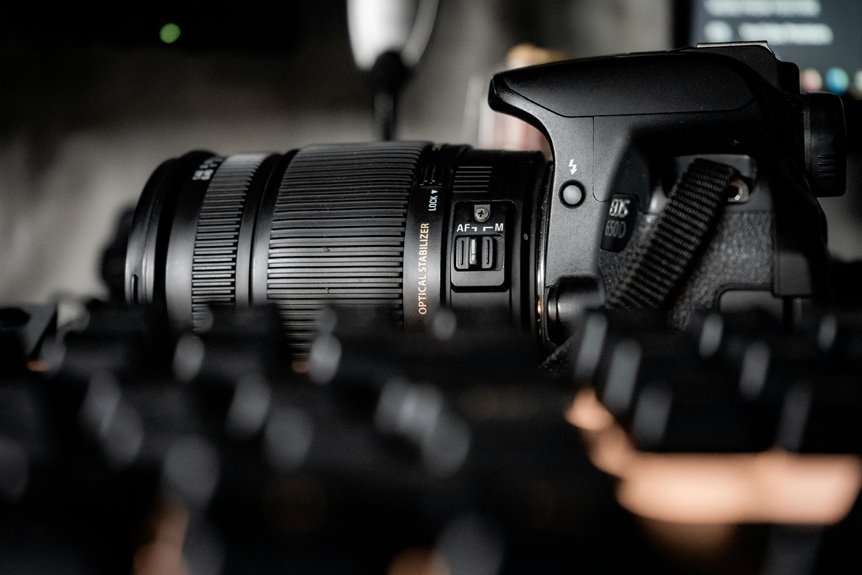

A camera that won’t focus usually has a simple cause, not a major fault. Common trouble spots include the AF switch, focus mode, dim light, dirty contacts, or standing too close to the subject. A few quick checks can often get sharp focus back fast. Start with the basic settings, because one small change is often all it takes.
Make Sure the Lens Is Set to AF
Why does your camera suddenly refuse to focus once everything seems fine? Often, the answer is simple: your lens switch got bumped from AF to MF. It happens to all of us, so don’t feel alone. Check the switch on the lens and camera body, then set both to AF.
Next, make sure lens mounting is secure, because a loose lens can break autofocus communication.
Once the switch is right, look a little deeper. Clean the lens contacts gently, since dirt can interrupt signals.
In case focus still acts strange, update lens firmware to improve how the lens talks to your camera. Also, test the lens on a still subject to see whether autofocus responds at all.
In the event it doesn’t, your settings might be fine, and the lens itself could require service or repair soon.
Check Your Camera Focus Mode
Before you change anything else, make sure your camera or lens isn’t still set to MF through mistake.
Then match the autofocus mode to your subject, because a still subject and a moving one don’t need the same focus behavior.
In case you pick the right AF mode from the start, you’ll save yourself a lot of blurry, frustrating shots.
Confirm AF/MF Setting
Should your camera suddenly won’t lock focus, start through checking whether it’s set to AF or MF. It sounds basic, but you’re not alone. Many of us bump the switch on the lens or camera body without noticing.
In case manual focus is on, autofocus won’t engage, no matter how many times you press the shutter halfway.
Next, look through the viewfinder and make sure the image itself looks clear to your eye. In the event it doesn’t, your diopter adjustment could be off, which can trick you into believing the camera missed focus.
Turn the diopter wheel until the viewfinder display looks sharp. Then switch back to AF if needed and test again on a still, well-lit subject. Small checks like this help you get back in sync fast and confidently.
Select Correct AF Mode
How often does the focus problem come down to the wrong AF mode, even in case your lens and settings seem fine?
You aren’t the only one in case this trips you up. An incorrect af choice can make a sharp scene look unreliable, especially whenever your subject moves and your camera stays in single-shot focus.
Change the Focus Point or Area Mode
In case your camera keeps missing focus, you might need to pick a better focus point or change the area mode.
You should place the focus point on the part of the subject you want sharp, then switch to a wider or tracking area whenever the scene has movement.
This small change often helps your camera lock on faster and saves you a lot of frustration.
Select The Right Point
One small change can fix a lot of focus trouble: pick the right focus point or area mode for your subject. You’ll get sharper shots once you choose the point that sits over the detail you care about most. That matters because viewfinder accuracy isn’t perfect, and those small boxes only suggest where focus lands.
In case your camera keeps missing, avoid peripheral focusing in dim light and trust the center point initially. Then place it over an eye, an edge, or another high-contrast detail.
- Use the center point whenever light is weak
- Place focus on eyes for portraits
- Aim at edges, texture, or contrast
- Keep in mind off-center points can react slower
- Recompose only in the event your depth of field allows it
You’re not doing it wrong. You’re learning what many photographers learn through practice.
Switch Focus Area
Focus area is your camera’s way of deciding where to look, so should it keep locking onto the background, switch the focus point or area mode instead of fighting it. You’re not doing anything wrong. Your camera just needs clearer directions.
In case you chose one point earlier, try a wider focus area once your subject fills less of the frame. In the event your camera keeps grabbing the wrong thing, shrink the focus zone so it pays attention to what matters.
Also, check where that focus zone sits in the frame. Many cameras let you move it with a joystick, touch screen, or arrows. Place it over an edge with contrast, like an eye, collar, or hairline.
That small change often makes your shots feel right again, and helps you stay confidently in control every time.
Match Scene Movement
Your focus area tells the camera where to look, and your focus mode tells it how to behave once your subject starts moving.
In case the scene changes, your settings should change too.
For still subjects, use single-point AF and single focus.
For kids, pets, or sports, switch to continuous AF with a wider area so the camera can follow movement and reduce tracking errors.
- A runner crosses the frame fast
- Your child zigzags toward you
- A bird jumps between branches
- A dancer spins under dim lights
- A car passes before sunset
These scenes need different focus behavior.
Whenever you match movement with the right area mode, you cut motion blur and keep more shots sharp.
You’re not doing anything wrong.
You’re learning how your camera sees, and that puts you with photographers who get results.
Give the Camera More Light
Whenever the scene is too dark, your camera has a much harder time locking onto a subject because autofocus needs light and contrast to work well. In case you’re shooting indoors, at dusk, or in deep shade, your camera might hunt back and forth and still miss focus. That’s frustrating, but you’re not doing anything wrong.
Instead, help your camera see better. You can increase exposure through opening the aperture, raising ISO, or slowing the shutter provided your subject isn’t moving. You can also add lighting with a lamp, LED panel, flash, or even upon stepping closer to a window.
Small changes often make a big difference. As you give the scene more usable light, autofocus responds faster and feels more dependable, so you can keep shooting with confidence and stay in the creative flow together.
Focus on a Subject With More Contrast
Even although the light is decent, autofocus can still struggle whenever the subject has very little contrast. Your camera needs edges, patterns, and separation to lock focus well. Once everything looks smooth or flat, it might hunt.
So help it through aiming at an area with stronger detail, then recompose should it be needed. That simple contrast adjustment gives the autofocus system clearer information through better texture recognition, and you stay in control.
- Focus on shirt seams, hair, or eyelashes
- Use the center AF point on defined edges
- Shift toward shadows meeting highlights
- Find printed text, bricks, or fabric weave
- Avoid blank walls, clear skies, and plain clothing
You’re not doing anything wrong whenever focus slips. You’re learning how your camera sees, and that skill helps you feel part of the craft.
Check the Lens Minimum Focus Distance
Strong contrast helps the camera find a target, but focus can still fail should you be simply too close for the lens to lock on. Every lens has a minimum distance, and whenever you move inside it, autofocus hunts because you’ve crossed its focusing limits. Step back a little, then try again. You’ll often feel the lens snap into place.
That matters even more after choosing a higher-contrast subject, because distance gives autofocus room to work with confidence.
| Situation | What you notice | What to do |
|---|---|---|
| Very close subject | Lens keeps hunting | Step back slightly |
| Small product shot | Sharp background | Increase camera distance |
| Flower fill frame | Focus won’t lock | Check lens specs |
| Macro lens attached | Works closer | Use the right lens |
| Portrait too tight | Eyes stay soft | Respect minimum distance |
Clean the Lens and Camera Contacts
Before you change more settings, take a minute to clean the lens and camera contacts, because a small layer of dust, oil, or pocket lint can quietly ruin focus. You’re not alone here. Every photographer deals with dirty gear, and a quick cleanup often brings sharpness back fast.
- Wipe smudged surfaces with a clean microfiber cloth.
- Add a drop of lens cleaner, not too much.
- Check metal contacts on the lens and camera mount.
- Use a blower to remove sensor dust near the mirror box.
- Make sure your phone case isn’t blocking the lens.
Then test focus again. Clean contacts help your camera and lens communicate better. A clear front element lets contrast return, so autofocus locks in with less hunting, especially in low light and busy scenes too.
Update Firmware if AF Still Doesn’t Work
Should autofocus still won’t behave after a careful cleaning, your camera or lens firmware could be the missing piece.
Makers release firmware updates to fix autofocus bugs, improve lens communication, and smooth out strange focus behavior that appears after months of normal use.
Rule Out Lens or Camera Hardware Damage
Should firmware updates and setting checks haven’t fixed the problem, it’s time to look for physical damage in the lens or camera body. You’re not alone here. Many photographers in our community run into focus trouble after a bump, drop, or moisture exposure.
Start with a careful physical inspection, then move into simple hardware diagnostics.
- Check the lens barrel for dents, cracks, or wobble.
- Inspect the front and rear elements for chips, haze, or fungus.
- Look at lens contacts for corrosion, dirt, or bent pins.
- Test the autofocus motor for strange clicks, grinding, or silence.
- Mount another lens or body to isolate the faulty part.
If focus still fails, don’t blame yourself. A repair shop can confirm internal damage and help you get back to shooting with confidence soon.
Frequently Asked Questions
Can Autofocus Problems Come From Lens Calibration Mismatch?
Yes, autofocus problems can come from a lens calibration mismatch. A common sign is consistent front focus or back focus. Update the lens firmware, check the autofocus motor, and fine tune each lens to your camera body.
Why Does My Camera Front-Focus or Back-Focus Consistently?
Your camera front focuses or back focuses consistently when the autofocus system and lens are not calibrated to each other with enough precision. This creates a repeatable focus shift in front of or behind your subject. You can often correct it with AF micro adjustment or a proper calibration service.
Can a Dirty AF Sensor Inside the Camera AFfect Focusing?
A dirty AF sensor inside the camera can reduce focusing accuracy. Dust or residue on the autofocus sensor area may cause autofocus to behave inconsistently until the area is cleaned carefully with a manual blower.
Does the Viewfinder Diopter Make Photos Seem Out of Focus?
Yes. A misadjusted viewfinder diopter can make a sharp scene look blurry in the viewfinder by changing how your eye sees the focus screen. It affects only what you see through the finder, not the photo itself or the camera’s autofocus.
Why Does Autofocus Fail More Often on Off-Center Focus Points?
Autofocus misses more often on off center points because those sensors are usually less sensitive. In low contrast scenes or when the subject sits at a difficult angle, they struggle more, while the center point often locks with greater speed and consistency, giving you a higher hit rate.